
Rainfall Lake Rise Calculator – Estimate Water Level Increase with Glacier Adjustment | Eqsy.io

Ever wondered how much a lake or reservoir rises after rainfall?
The Rainfall Lake Rise Calculator helps you estimate changes in water level based on rainfall depth, catchment size, and lake surface area.

The tool instantly converts your input into an easy-to-understand visual display — showing how the lake level rises on a live depth ruler, with the option to switch units between millimeters and inches.

You can also adjust for runoff efficiency and even include glacier influence, which automatically accounts for delayed meltwater and reduced flow from icy basins.

Whether you’re an environmental student, hydrologist, engineer, or simply curious about how rainfall impacts local lakes, this calculator provides a clear and educational way to understand water balance in nature.

✅ Supports metric and imperial units
✅ Includes runoff / infiltration adjustment
✅ Features glacier toggle for cold-region accuracy
✅ Displays a live water-level rise visualization with depth ruler

Try it now — see how just a few millimeters of rain can dramatically change a lake’s level.

🌧️ Rainfall to Lake Level Rise Calculator

Estimate how rainfall increases a lake’s water level based on catchment area, rainfall, runoff, and optional glacier adjustment.


km²

km²

mm

%

Result:

0
50
100
150
200
mm

Share this result:

Subscribe for updates

💧 How to Use the Rainfall Water Level Calculator

Estimate how rainfall affects lakes and reservoirs worldwide. This calculator converts rainfall, catchment area, and lake surface data into a visual estimate of water level rise — perfect for environmental analysis, hydrology, or general curiosity.

To calculate, you’ll need:

  • Catchment area – total land area draining toward the lake.
  • Lake surface area – visible surface of the lake.
  • Rainfall – precipitation depth (mm or inches).

📏 Step 1: Measure the Lake Area

Open Google Maps or Google Earth Pro and right-click on the lake → “Measure distance.” Click around the shoreline to outline the lake, then close the shape. Google will display the Total area in square meters (m²). Divide by 1,000,000 to convert to km².
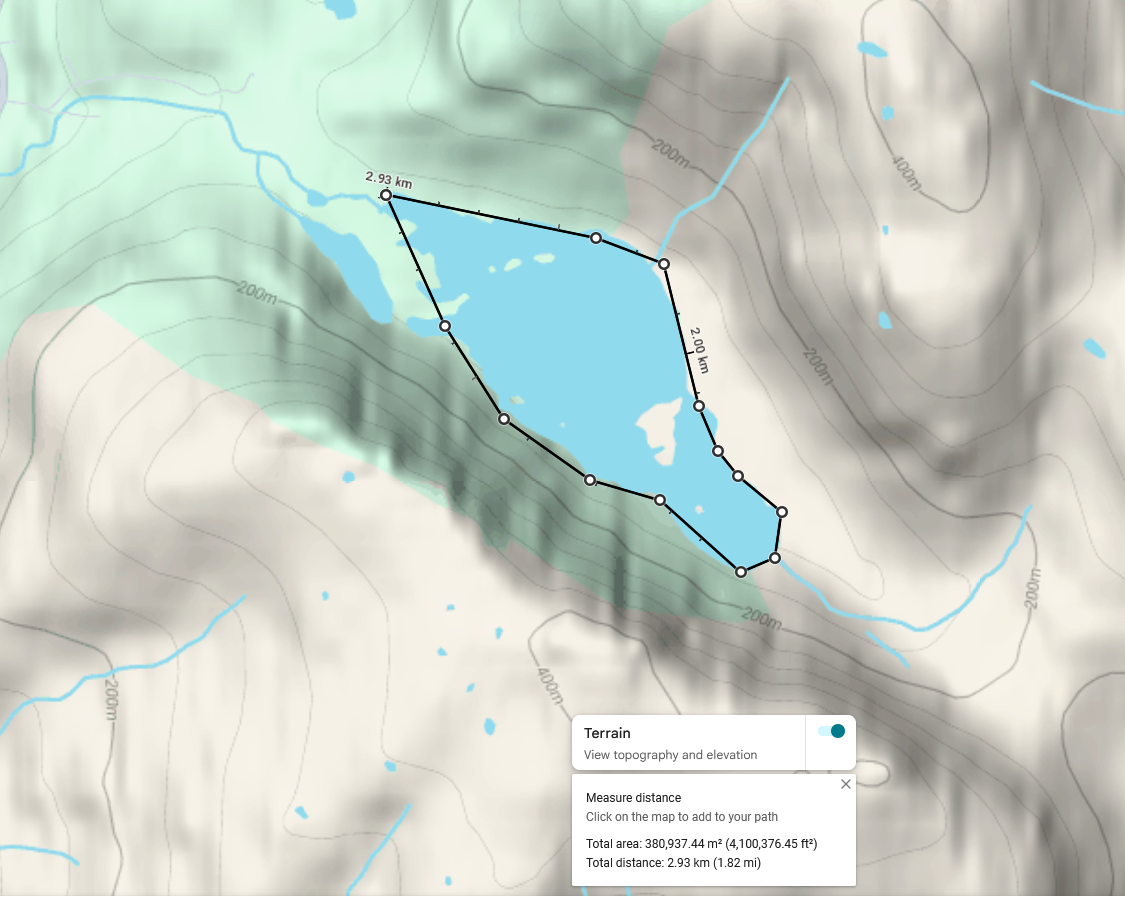
Lake surface area measurement example
Example: Lake surface area measurement — total 380,937 m² ≈ 0.38 km²

🏔️ Step 2: Measure the Catchment Area

Switch to Terrain view and trace the highest ridges and slopes that drain into the lake. This forms the catchment basin — the land funneling rainfall toward the water. In this example, the catchment area is 2.66 km².
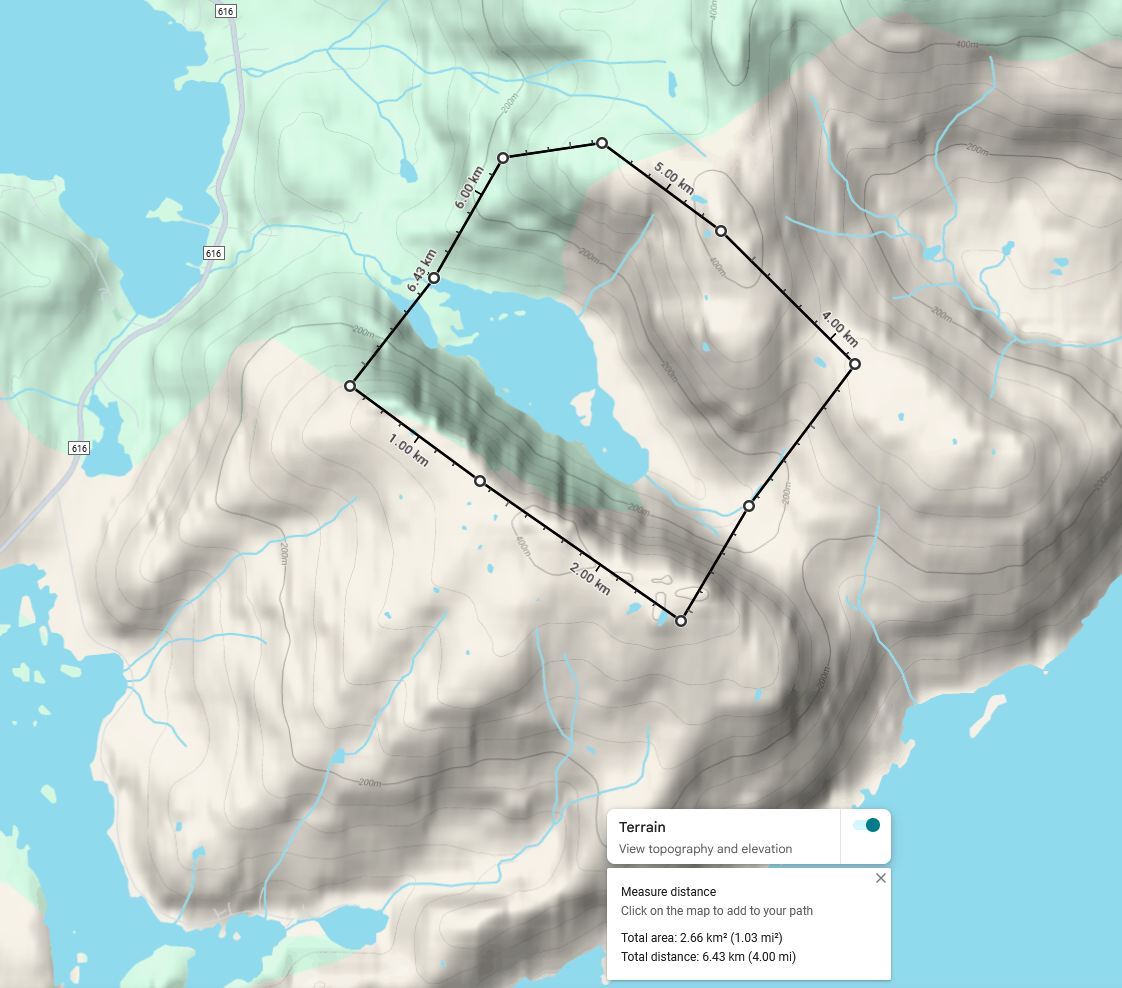
Watershed catchment measurement example
Example: Catchment area measurement — total 2.66 km²

🧊 Step 3: Glacier / Snowfield Adjustment

If a glacier or permanent snowfield lies within the catchment, enable the “Include glacier adjustment” toggle. This accounts for meltwater and faster runoff efficiency, representing how melting ice contributes to inflow beyond rainfall alone. In glacial basins, rainfall is often delayed or enhanced due to snowmelt.

Note: Real glacier influence depends on temperature, season, and exposure. The calculator gives an indicative adjustment only.

🌧️ Step 4: Infiltration / Runoff Factor

Not all rainfall reaches the lake — some infiltrates into the soil. The Runoff / Infiltration factor (% reaching lake) lets you define what percentage of total rainfall actually flows into the lake. If 30% infiltrates, only 70% reaches the lake — so enter 70% in the calculator.

Typical values for different terrain types:

  • 🌲 Forested terrain: 60–80% of rainfall reaches the lake (20–40% lost to infiltration)
  • 🪨 Rocky or impermeable ground: 90–100% reaches the lake
  • 🏞️ Mixed terrain: 75–90% reaches the lake

The calculator automatically adjusts inflow volume based on the chosen runoff efficiency.

📊 Step 5: Enter the Data

Example inputs:

  • Catchment Area: 2.66 km²
  • Lake Surface Area: 0.38 km²
  • Rainfall: 5 mm (≈0.2 in)
  • Runoff Efficiency: 80%
  • Glacier Adjustment: Off (toggle On if glacier in basin)

The calculator estimates how many millimeters or inches the lake level would rise if all effective runoff entered the lake directly.

⚙️ About Outflow and Drainage

If your lake has an outlet stream or river, some inflow will escape immediately. This means the calculated rise represents a theoretical maximum — a “no-outflow” scenario. In real lakes, the actual rise will be smaller and slower depending on the outlet’s slope and capacity.

Still, this tool provides a reliable first approximation for understanding how rainfall translates into potential lake-level change before losses and outflow occur.

⚠️ Note: This is a simplified hydrological estimate. Real conditions include evaporation, seasonal snow storage, delayed runoff, and groundwater interaction.

⬆️ Back to top

Can I use this calculator for any lake?

Yes. The calculator can be used for any natural or artificial lake, pond, or reservoir — as long as you can estimate both the lake’s surface area and the size of the surrounding catchment basin. Results are most accurate when the terrain boundaries are clearly defined (for example, mountain basins or isolated valleys).

When you enable this option, the calculator increases the effective runoff efficiency — meaning a larger portion of precipitation (and meltwater) is assumed to reach the lake. This simulates the additional inflow from melting snow and ice during warm periods. It’s useful for high-mountain regions or areas where snowfields persist year-round.

Use these typical ranges depending on terrain type:

  • 🪨 Rocky or impermeable terrain: 90 – 100 % of rainfall usually runs off directly

  • 🏞️ Mixed terrain: 75 – 90 % reaches the lake

  • 🌲 Forested or vegetated terrain: 60 – 80 % reaches the lake

If you’re unsure, a value around 80 % provides a good general estimate for many landscapes.

No. The model assumes there is no water leaving the lake during the rainfall period. If the lake has a constant outlet stream or high evaporation rates, the real rise in water level will be lower than the calculated value. If your lake drains through a river or an outlet channel, part of the new inflow will exit almost immediately.
In this case, the calculator’s result should be seen as the maximum potential rise before losses.
The real increase depends on the outlet’s capacity and slope — a fast-flowing or wide river will reduce the rise significantly, while a small or slow channel might allow a temporary accumulation before the level stabilizes.

This is an approximate hydrological estimate. Accuracy depends on how precisely you define the catchment and lake area, and how realistic your infiltration percentage is. Expect typical deviations of ±10–20% for well-defined basins.

You can switch freely between metric (mm, km²) and imperial (inches, mi²) units. The tool automatically converts between systems to keep calculations consistent.

If the glacier or snowfield only covers part of the drainage area, you can either keep the “Glacier present” toggle off and reduce infiltration slightly (around 10%), or leave it on but raise infiltration (30–40%) to balance the effect.

Because Google Maps and Google Earth Pro provide a simple, accurate way to outline natural shapes such as lakes and catchment basins. The “Measure distance” and “Terrain view” tools let you trace real contours and get surface area values in square meters or kilometers.

Yes. Once the page is loaded, the tool works entirely inside your browser — no external connections are required. It’s both privacy-friendly and fast, even with limited connectivity.

🌍 About This Tool

The Rainfall-to-Lake Rise Calculator visualizes how rainfall affects lake levels using simple hydrological principles.
It’s ideal for:

  • quick environmental field estimates

  • classroom demonstrations

  • reservoir management

  • basic flood modeling

The glacier option accounts for snow and ice storage by reducing the effective runoff.


🧊 Glacier Influence & Limitations

If glaciers are present within the catchment:

  • Rainfall on glaciers may be stored as ice, not direct runoff.

  • Meltwater contribution depends on heat balance, not precipitation.

  • Sudden outbursts (jökulhlaups) can produce unpredictable results.

Therefore, either exclude glacier-covered areas or use the glacier adjustment toggle for more realistic output.


© 2025 Eqsy.io – Free Online Tools